
Asus Zenbook DUO UX8407 Review – Dual Display Laptop for 2026 with Panther Lake Doubles Up For The Win
One of the incontrovertible laws of tech is that you can never have screen real estate – the more the merrier – whether you’re a gamer or a hardcore multitasking maestro. Rather than simply cramming in a larger screen in a laptop, Asus has approached the problem from another angle and crammed in not one but two 14-inch OLED touchscreens in their Zenbook DUO UX8407 laptop.
We managed to get the 2026 refresh of the laptop for review and took it around for a spin – here’s our Asus Zenbook DUO UX8407 review where we share if this dual screen display is worth its impressive price tag.
Asus Zenbook DUO UX8407 review – Build and Design
Table of Contents
Asus has been tinkering with the concept of a dual-screen laptop for years, with the most recent example and direct predecessor being the Zenbook DUO UX8406 that debuted in 2024. Wind the clock back to 2022 and you get one of its earlier experiments in the form of the Asus Zenbook 17 Fold OLED, aka the UX9702AA, which we reviewed at the time. Go back even further and you’ll find recognisable, if somewhat early, iterations of the dual-screen concept in the Zenbook Pro DUO series, which first made its way to market in 2019 in various permutations.
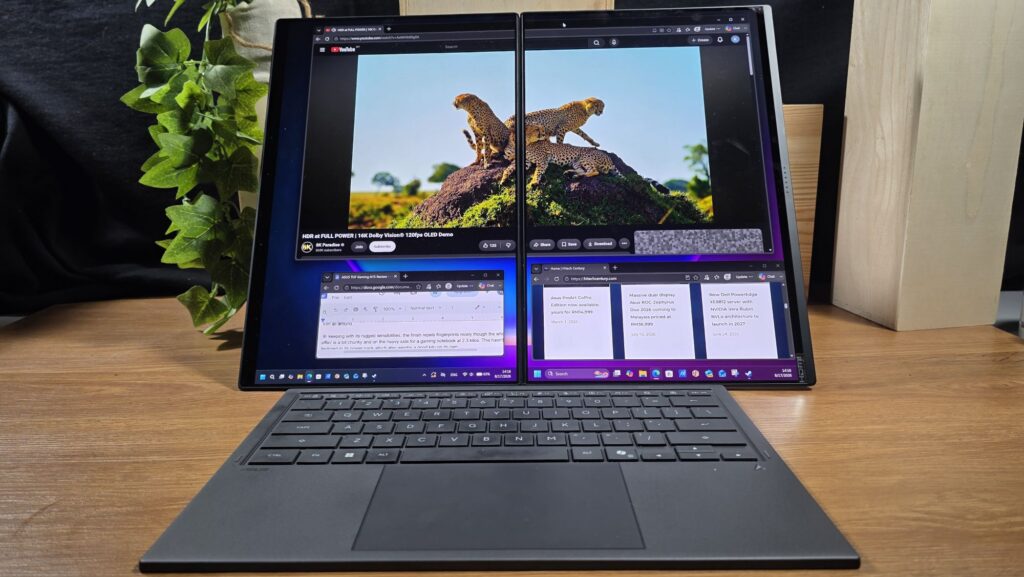
In concept, the Asus Zenbook DUO UX8407 laptop features two separate OLED touch displays connected by a 180-degree hinge that sandwich a detachable wireless keyboard, allowing users to effectively tote around 28-inches of screen real estate in a compact form factor little larger than a 14-inch laptop.
On paper, our Asus Zenbook DUO UX8407 review sample has 29% slimmer side bezels and 21% slimmer bottom bezels on its displays that help to make the chassis 5% smaller overall compared to its predecessor the UX8406.
At a glance, the laptop is chunky enough to look like two stacked ultraportables at 19.5mm thin and the inclusion of two displays balloons the weight up to a rather hefty 1.65kg. Fortunately, its footprint still fits the dimensions of a 14-inch laptop and it can still be packed into a backpack without too much trouble.
The metal top lid of the laptop comes with the Asus Zenbook logogram emblazoned in silver over a matte gray Ceraluminium coating. Developed by Asus, Ceraluminum has seen use in many other Zenbook designs and is relatively scratch resistant and smudge proof.
The top lid is well built though there’s a bit of give in the centre portion if you give it a determined prod though the sides are sturdy with minimal play. Unfortunately, the Ceraluminum finish is restricted to the top lid and the rest of the design utilises a more conventional polycarbonate chassis with a dark grey finish.
Flipping our Asus Zenbook DUO UX8407 review unit upside down revealed a polycarbonate base, presumably for weight savings, with an integrated kickstand. To accommodate the weight of the displays, the kickstand takes up almost two thirds of the base and folds out to a 90-degree angle.

This allows the laptop to be propped up vertically in either portrait or landscape mode mode. Just beneath the kickstand, the laptop has a small screwed-down maintenance hatch that grants you immediate access to the one and only M.2 2280 SSD slot that’s currently taken up by a 1TB SSD. You also get a set of raised rubber feet for ventilation and grilles for two downward firing speakers.
On the left side of the laptop, you get a single HDMI 2.1 FRL port, a Thunderbolt 4 port and a 3.5mm combo audio jack. The right side hosts a single USB 3.2 Gen 2 Type-A port , an additional Thunderbolt 4 port and a power button. Closer inspection also reveals the detachable Bluetooth keyboard sandwiched neatly between both displays.

The hinge mechanism itself is built like a tank, allowing you to smoothly angle it all the way flat to a 180-degree angle while being almost completely wobble free.
The hinge itself is also protected by a strip of chromed aluminium and the mechanism is smooth enough to allow for one-handed opening. Asus has also reinforced the hinge to sustain over 40,000 open-close cycles while being able to handle 15kg of load-bearing weight for good measure. However, the laptop itself and its hinges are not dust or water resistant so you’ll likely have to nix any plans of taking this to the beach.

On closer inspection, the detachable wireless backlit keyboard has magnetised edges, allowing it to be securely stowed between the both displays. The keyboard layout is relatively standard, features 1.7mm of key travel and also features a touchpad with gesture controls by sliding a finger across its edges.
The side of the keyboard features a USB-C port for charging and a slider to turn the keyboard on or off. The underside of the keyboard has a set of magnetised pogo pins that interact directly with a matching set at the bottom half of the laptop, allowing for charging off the laptop’s 99Wh battery. Unfortunately, the keyboard lacks its own kickstand and is designed to lie completely flat on a surface which isn’t exactly the most ideal angle to type on.

On paper, Asus has rated the keyboard to be able to offer up to 52 hours of battery life with backlighting off and up to 11.6 hours with backlighting on. On top of Bluetooth and its integrated Pogo pins, you’re also able to connect the keyboard via a USB-C cable which makes it rather versatile.
When attached in its default position, you’re able to use the Zenbook DUO UX8407 as a conventional clamshell laptop. If needed, the keyboard can be detached from the laptop itself and the laptop can be propped up on its kickstand, allowing you to use it much like a desktop PC in horizontal or vertical orientation. Alternatively, you can just use it like a massive Windows tablet.
Each 14-inch Lumina Pro OLED touch display panel features 2,880 x 1,800 pixels resolution, a tall 16:10 aspect ratio and a 144Hz refresh rate. The displays also feature 100% DCI-P3 colour gamut, are Pantone Validated and also feature VESA Certified Display HDR True Black 1,000, making it ideal for content creators who require accurate colour rendition for editing photos and videos.
The panels also feature an anti-reflection coating that reduces glare and ambient light by 65%. In addition, the screen also supports stylus input and Asus ships the laptop with one stylus (Asus Pen SA205H) along with its wireless charger sleeve. Asus has also reinforced the displays with Corning Gorilla Glass for good measure.
For good measure, Asus has also reinforced both panels against impacts. Assuming you hold it vertically, the top panel can survive a respectable 5kg of direct pressure while the bottom is able to withstand a whopping 15kg of force.
A gap does exist between both screens on account of the hinge mechanism but it’s noticeably 70% narrower than its predecessor at 7.66mm thin on account of refinements in the hinge design compared to the older Zenbook DUO UX8406 that had a larger 25.31mm gap.
In terms of overall build quality, our Zenbook DUO UX8407 review unit is solidly constructed for everyday office and home use. While it is understandably a bit on the heavy side, it’s still a feat of engineering as Asus has managed to cram in two 14-inch displays in a compact form factor that’s a little larger than a 14-inch laptop. For charging duties, Asus has kept things logistically efficient with a bundled 100W USB-C charger that has a charging brick small enough to stuff into a pocket.
Zenbook DUO UX8407 Review – Performance and Benchmarks
In terms of hardware, our Asus Zenbook DUO UX8407 review sample comes with the new 16-core Intel Core Ultra X9 388H mobile processor, Intel’s premier chipset from the Panther Lake family that hosts a quartet of Cougar Cove-P cores clocked at up to 5.1GHz, 8 efficient Darkmont E cores clocked at up to 4.0GHz for most of the grunt work and another quartet of power-efficient Darkmont LP E-Cores clocked at 3.7GHz for basic grunt tasks.
The processor is rated for up to 45W processor power, comes with an integrated Intel Arc B390 GPU, a seventh generation Image Processing Unit (IPU) and a fifth generation NPU rated for up to 50 TOPS. In essence, Panther Lake is designed to deliver substantially higher performance-per-watt than its predecessors while retaining strong multi-core performance
Paired with the Intel Core Ultra X9 388H processor is 32GB LPDDR5X RAM that has been soldered in as well as a 1TB SSD on the single SSD slot though retail units pack a 2TB SSD. It also features the aforementioned Intel Arc B390 graphics. This lends it a performance profile that is deal for content creation on the go, serious paperwork duties up to and involving massive spreadsheets and light gaming too. Here’s how our Asus Zenbook DUO UX8407 review sample for the Malaysia market stacks up on paper:
| Price | RM13,999 [Intel Core Ultra X7 358H/32GB RAM/1TB], RM15,999 [Intel Core Ultra X9 388H/32GB RAM/2TB] |
| Display | Dual 14.0-inch Asus Lumina Pro OLED, 2,880 x 1,800 pixels, 16:10 aspect ratio, 0.2ms response time, 144Hz refresh rate, 100% DCI-P3, 1,000 nits HDR peak brightness, VESA Certified Display HDR True Black 1,000, Pantone validated |
| Processor | Intel Core Ultra X9 388H 2.1GHz, up to 5.1GHz, Intel NPU up to 50 TOPS |
| OS | Windows 11 Home |
| Memory | 32GB LPDDR5X RAM / 2TB M.2 NVME PCIe 4.0 SSD |
| Graphics | Intel Arc B390 Graphics |
| Battery | 99Wh, 4-cell Li-ion, 100W Type-C AC adapter |
| Size/Weight | 310.1 x 208.6 x 19.6mm / 1.65kg |
Technically speaking, our test unit maps more closely to the higher end model available in Malaysia priced at RM15,999 save for a smaller SSD. Another configuration exists with an Intel Core Ultra X7 358H processor, 32GB RAM and a 1TB SSD.for RM 13,999.
Like other Asus laptops, the Zenbook DUO UX8407 comes with their MyAsus software that offers diagnostics, manages updates and lets you modify power settings and fan speed in one centralised interface. When plugged in and set to Performance mode, our Zenbook DUO UX8407 review unit scored the following benchmarks:
| 3D Mark Speed Way | 888 |
| 3D Mark Solar Bay | 24,466 |
| 3D Mark Solar Bay Extreme | 4,302 |
| 3D Mark Steel Nomad | 1,512 |
| 3D Mark Steel Nomad Light | 5,729 |
| 3D Mark Port Royal | 3,883 |
| 3D Mark Night Raid | 48,392 |
| 3D Mark Time Spy Extreme | 3,576 |
| 3D Mark Time Spy | 7,819 |
| Geekbench 6 Single Core | 2,694 |
| Geekbench 6 Multi Core | 18,917 |
| Geekbench 6 OpenCL | 45,464 |
| Geekbench 6 Vulkan | 48,347 |
| Cinebench 2026 (Multi core) | 4,275 |
| Cinebench 2026 (Single Core) | 508 / 8.42 x MP ratio |
| PCMark 10 Work 3.0 Extended | 10,315 |
This is the first Intel Core Ultra X9 388H processor that we’ve tested and the closest relative we have benchmarked is its lesser sibling the Intel Core Ultra 9 386H used in the Zenbook S 14 UX5406.


The Intel Core Ultra 9 386H also features 16 cores but differs in that its four performance cores are clocked slower than the 388H and notably has less capable Intel Graphics. On the other hand, the Intel Arc B390 integrated graphics used in the Intel Core Ultra X9 388H chipset features 12 Xe cores and is far more capable, allowing for more demanding tasks including light gaming too.


Compared side by side, our Asus Zenbook DUO UX8407 review unit offered improved performance and markedly better graphics performance on account of its better Intel Arc B390 integrated graphics.


In more practical terms, there’s more than enough pixel crunching punch under the hood to tackle general computing up to and including video editing on DaVinci Resolve and CapCut. The laptop was also able to offer respectable performance with older games. In Rise of the Tomb Raider playing on one display and on High settings, the laptop was able to get an average of 45.52fps.

In Shadow of the Tomb Raider on default settings with Intel XeSS off, it scored an average of 60fps. In Cyberpunk 2077’s internal benchmark, with High graphic settings and Intel Xess Super Resolution 2.0 set on auto, it was able to get an average 28.98fps which is respectable for a rig that does not feature a dedicated graphics card.


When it comes to endurance, the Asus Zenbook DUO UX8407 is impressively appointed with a 99Wh battery that is rated for up to 32 hours of video playback when using a single screen and up to 18 hours with both screens on.
With 50% screen brightness and using one display like a normal laptop, our Asus Zenbook DUO UX8407 review sample managed to yield 11 hours and 29 minutes of battery life with one screen on and a total of 7 hours and 43 minutes with both screens on in the PC Mark8 Work Accelerated battery life test.
In practical terms, our Asus Zenbook DUO UX8407 review sample with 70% screen brightness, WiFi on and a combination of paperwork, video watching and video editing was comfortably able to last a full work day with a 100% charge at 10am and coasting at about 35% near the end of the work day. Your mileage will of course vary depending on your usage patterns.


sus Zenbook DUO UX8407 review – Double screen Creative benchmark test

sus Zenbook DUO UX8407 review – Single screen Creative benchmark test
Easily the main attraction and what gives it its unique designation, the dual 14-inch Lumina Pro OLED touch displays are colour calibrated with a quoted 100% DCI-P3 colour gamut along with VESA DisplayHDR 1000 True Black and up to 1,000 nits peak brightness, making them ideal for content creators.

With its ability to be deployed vertically or horizontally as a large display, as a conventional clamshell laptop or as a massive tablet, the laptop is highly versatile and able to handle scenarios that would have typically required an additional separate display or a tablet. Colours are punchy and vibrant while screen brightness is excellent for indoor use though the reflections are distracting especially under outdoors under sunlight.
In practical use, the Zenbook DUO UX8407 is ideal for a mobile work setup and has the performance and screen real estate to handle almost everything asked of it short of serious gaming duties. In full display mode, it made looking at text drafts side by side a cinch and those who need to have multiple browser windows open will love the added screen real estate.

While it is compact and portable, its weight and unique design may draw unwanted attention, especially if you plonk on a table in its full display mode in your local coffee shop though that’s what its laptop mode is for.
Typing was a pleasure on the detachable keyboard with its smooth, responsive touchpad offering fast and responsive input. However, its inability to adjust its typing angle does make it rather irksome though it is not a deal breaker.
Should you buy the Asus Zenbook DUO UX8407?
The Asus Zenbook DUO UX8407 is an exceptional design that bundles two high-quality OLED touch displays in a robust form factor with excellent performance and battery life.

The provision of a detachable keyboard, robust hinges and toughened displays, all in a compact 14-inch ultraportable form factor. It doesn’t come cheap, clocking in at a substantial RM13,999 at the time of writing, but this is one of, if not the best laptop designs that money can buy.

Asus Zenbook DUO UX8407 review sample courtesy of Intel Malaysia. For more details visit Intel Malaysia’s page at https://www.intel.com/ and Asus Malaysia’s official product page at https://www.asus.com/my/laptops/for-home/zenbook/asus-zenbook-DUO-ux8407/
Asus Zenbook DUO UX8407
-
Display
-
Performance
-
Battery Life
-
Design
-
AI Capabilities
-
Valuie
Asus Zenbook DUO UX8407
The Asus Zenbook DUO UX8407 is an exceptional design that bundles two high quality OLED touch displays in a robust form factor with excellent performance and battery life, making it a multitasker’s delight and one of the best laptop designs that Asus has ever made.
Pros
Large and vibrant dual OLED touchscreens excellent for content creators and paperwork
Good performance even for demanding tasks
Solid battery life for its capabilities
Easily accessible SSD slot
Cons
Rather expensive
Only one SSD slot
RAM is soldered in
Still rather heavy
Doesn’t ship with stylus in Malaysia
No dust or water resistance