
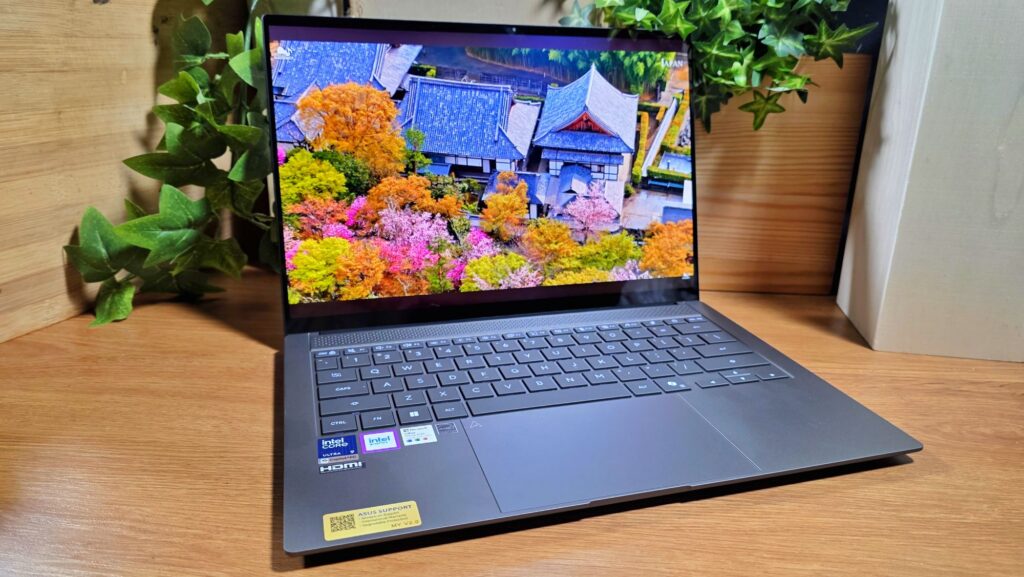
Asus Zenbook S 14 Review (UX5406AA) – Compact computing powerhouse means business
When it comes to ultraportables, Asus has had a lead on the competition for many years with their Zenbook series of laptops for mainstream users and their enterprise-oriented ExpertBook series.

Announced earlier at CES 2026, the Zenbook S 14 aka model UX5406AA has finally made it to our shores. We’ve had the laptop for several weeks now as a daily driver laptop – here’s our Asus Zenbook S 14 review where we share our findings if this impressively equipped laptop is worth what you pay for.
Asus Zenbook S 14 Review (UX5406AA) – Build and Design
Table of Contents
While it looks like a smaller sized version of the Zenbook S 16 and retains the same role as a high-end ultraportable for power users along with a smaller-sized but similarly premium display, it utilises a different processor altogether and instead uses the latest Intel chipset rather than AMD.
Out of the box, our Asus Zenbook S 14 review sample comes with a top lid coated in a smudge-resistant and surprisingly premium looking Ceraluminum finish that feels luxurious to the touch. Closer inspection also reveals that its fingerprint and relatively stain resistant too. Unfortunately, this unique finish is only on the top lid with the base and keyboard tray featuring otherwise conventional aluminium.

The underside is otherwise unremarkable save for a set of ventilation grills and two raised rubber feet that run along the length of the chassis to offer a measure of airflow. You also get a pair of slits on each end for the downward firing quad speakers.

The left side hosts a single HDMI 2.1 (TMDS) port, a pair of USB-C Thunderbolt 4 ports with support for display and power delivery to charge the laptop as well as a 3.5mm combo audio jack. The right side of the laptop hosts a single USB-A 3.2 Gen2 port. This mirrors the port selection on the larger Zenbook S16 though it lacks the S16’s card reader which is somewhat irksome especially if you’re a content creator.

Out of the box, Asus has provided a fairly compact charging brick that terminates in a 65W USB-C port for charging the laptop with its small-size making it easier to toss into a backpack or handbag. Also bundled with our Asus Zenbook S 14 review unit was a sheaf of paperwork including the usual warranty and quick start guides.
Flipping the laptop open is a smooth, one-handed affair thanks to its well-built hinges that are wobble-free and stay in place though they max out at about a 135-degree angle and are unable to open fully flat.

The keyboard on our Asus Zenbook S 14 review unit features a fairly compact layout and has white backlighting along with a set of function keys on the top row for immediate access to the volume, screen brightness, screen capture, speaker and webcam kill switch and a dedicated shortcut to the MyAsus app.
Of note is the generously sized touchscreen that now has built-in shortcuts to manage critical settings. Stroking the left edge up and down lets you control volume while doing so on the right side allows you to manage screen brightness.

The display 14-inch OLED display is touch capable, offering up 3K (2,880 x 1,800 pixels) resolution with a respectable 1,100 nits HDR peak brightness and a 120Hz refresh rate. Of greater value is its 100% DCI-P3 colour gamut as well as its Pantone validation which makes it suitable for content creators who require colour accuracy when editing their work.
Perched up top is a 1080p IR webcam which allows for Windows Hello authentication and video calls. Oddly enough, the webcam lacks a privacy shield though this isn’t a deal breaker unless you’re particularly security conscious.

Overall, our Asus Zenbook S 14 review is sturdy and well built with its 11.9mm slim chassis and light 1.2kg carry weight allowing for comfortable all-day carry.
There’s no dust or water resistance though it does have a MIL-STD-810H rating for shock and minor drop resistance so some care needs to be taken to avoid any accidental encounters with liquids like spilled water or rain.
Asus Zenbook S 14 review (UX5406AA) – Performance and Benchmarks
In terms of hardware, our Asus Zenbook S 14 review sample aka model UX5406AA comes with an Intel Core Ultra 9 386H processor.
Intended for high-end thin and light laptops, the Intel Core Ultra 9 386H processor is rated for up to 80W of power and is certified as a Copilot+ laptop by Microsoft to run their AI in an optimal fashion thanks to an NPU rated for up to 50 TOPS.
Up close, the Intel Core Ultra 9 386H features 16 cores divided into four performance cores with a boost up to 2.1GHz, 8 efficiency cores that can boost up to 4.9GHz and four low-power efficiency cores clocked at up to 3.7GHz. For graphics, the processor comes with integrated Intel Graphics that consists of a quartet of Xe cores with ray tracing support.
The Intel Core Ultra 9 386H is paired with 32GB LPDDR5X RAM that has been soldered-in, a 1TB SSD on a single expansion slot and integrated Intel Graphics which precludes any long-term upgradability though seeing the sky high prices of RAM and storage these days, it likely won’t be much of an issue for the immediate future.
Another configuration exists that is slightly more affordable which is otherwise similar but uses a slightly less powerful Intel Core Ultra 7 355 2.3GHz processor rated for up to 49 TOPS and has 16GB LPDDR5X RAM with the same 1TB SSD storage. Here’s the specifications of our Asus Zenbook S 14 review unit for the Malaysia market:
| Price | RM8,499 |
| Display | 14-inch 3K touch OLED (2,880 x 1,800 pixels), 1,100 nits HDR peak brightness, 100% DCI-P3, 120Hz refresh rate, Vesa Certified Display HDR True Black 1000, Pantone Validated, TÜV Rheinland-certified, SGS Eye Care Display Certification |
| Processor | Intel Core Ultra 9 386H |
| Graphics | Intel Graphics |
| OS | Windows 11 Home |
| Memory | 32GB LPDDR5X RAM/ 1TB M.2 NVMe PCIe 4.0 SSD |
| Battery | 77Wh 4-cell Li-Ion w/ 100W USB Power Delivery, 65W USB-C charger provided |
| Size/Weight | 310.3 x 314.7 x 11.9mm / 1.2kg |
Like other Asus laptops, the Zenbook S 14 has their MyAsus management app that lets you manage system updates, perform diagnostics and also control performance settings. When plugged in and set to Performance mode.
| 3D Mark Speed Way | 437 |
| 3D Mark Solar Bay | 12,364 |
| 3D Mark Steel Nomad | 536 |
| 3D Mark Steel Nomad Light | 2,088 |
| 3D Mark Port Royal | 1,422 |
| 3D Mark Night Raid | 30,121 |
| 3D Mark Time Spy Extreme | 1,544 |
| 3D Mark Time Spy | 3,361 |
| Geekbench 6 Single Core | 2,832 |
| Geekbench 6 Multi Core | 16,566 |
| Geekbench 6 OpenCL | 23,742 |
| Geekbench 6 Vulkan | 25,055 |
| Cinebench 2024 CPU (Multi core) | 3,797 |
| Cinebench 2024 GPU (Single Core) | 504 / x7.53 |
| PCMark 10 Work 3.0 Express | 7,297 |
In terms of overall performance, the 2026 model of the Zenbook S 14 with its Intel Core Ultra 9 386H processor was able to hold its own against its larger sibling the Zenbook S 16 with its AMD Ryzen AI 9 465 processor and outpace it in synthetic benchmarks.
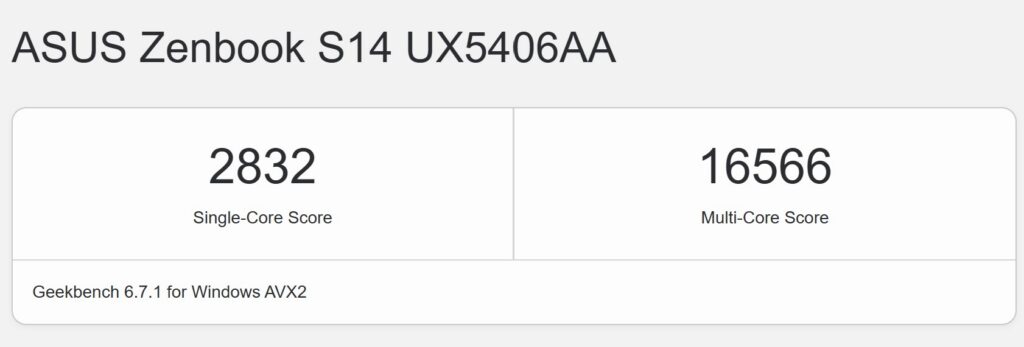
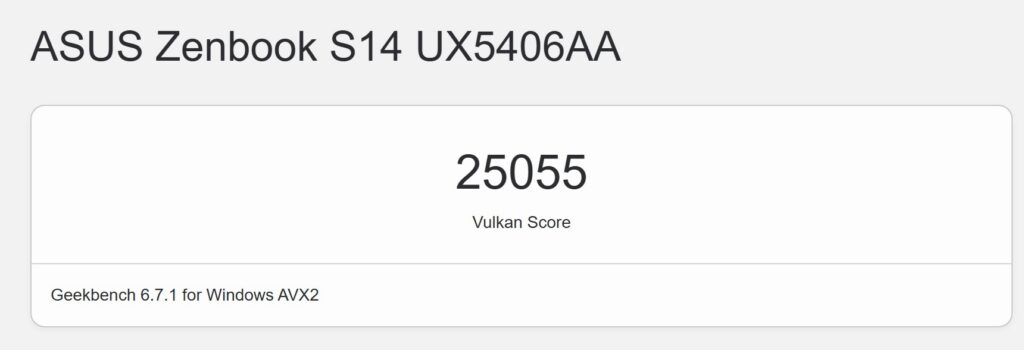
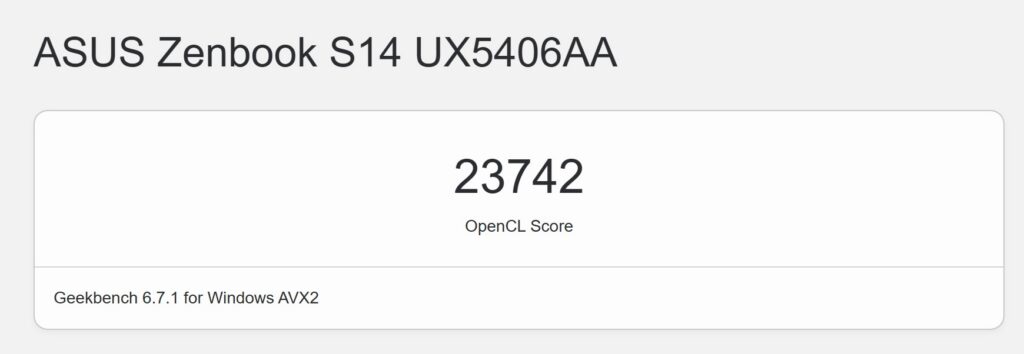
Oddly, it wasn’t able to run any of the PCMark benchmarks save for the most basic one PCMark 10 Express which saw it getting a decent score though this is an indicator for basic paperwork rather than a fuller spectrum of tasks including video or photo editing and content creation.

In Geekbench AI, the Zenbook S 14 was able to offer a respectable 8,431 quantised AI scores for AI using the CPU while benchmarks using the integrated graphics got a 4,558 quantised score.

In more practical usage scenarios, our Zenbook S 14 review sample acquitted itself in a respectable fashion for general computing tasks with snappy multitasking and smooth performance when editing documents in Open Office suite as well as basic photo editing in Canva and 1080p video edits in CapCut without issue. While it isn’t intended for gaming, it still manages to run e-sports titles like Counterstrike 2 in a relatively playable fashion.
Of note with our Asus Zenbook S 14 review sample are its solid thermals and even with extended heavy usage and back-to-back benchmarks in Performance mode, the laptop remained warm but not blazing hot to the touch and the cooling fans ran relatively quiet even at full tilt.


The 14-inch 3K OLED touchscreen served up luscious and vibrant colours and text is delightfully sharp and detailed. The improved screen brightness is helpful but the screen is best viewed indoors away from sunlight. Audio from the speakers was handled well with a good amount of volume and detail, allowing you to go through a good chunk of your Spotify playlist in a pleasant fashion.

Where our Asus Zenbook S 14 review sample excelled was in terms of battery life though this varies somewhat based on usage and screen brightness.
While we weren’t able to get PCMark to run, it managed to survive a good 10 or so hours when subjected to about 50% screen brightness and general paperwork along with Spotify running in the background which is respectable by any measure of the word.
Should you buy the Asus Zenbook S 14 (UX5406AA) ?
As it stands, the Asus Zenbook S 14 (UX5406AA) is a slim, well-designed ultraportable that is ideal for general computing tasks and even light content creation thanks to its OLED touch display and Intel Panther Lake chipset. Add in its respectable battery life and you have a contender for power users looking for a slim and light laptop for the office.

However, it comes at a rather hefty price and its graphics performance leaves something to be desired especially if you’re looking to game on it though this does not detract from what is otherwise a very desirable ultraportable.

Asus Zenbook S 14 Review (UX5406AA) sample courtesy of Asus Malaysia. For more details please visit https://www.asus.com/my/laptops/for-home/zenbook/asus-zenbook-s-14-ux5406/techspec/
Asus Zenbook S 14 UX5406AA
-
Display
-
Performance
-
Battery Life
-
Design
-
AI Capabilities
-
Value
Asus Zenbook S 14 Review UX5406AA
As it stands, the Asus Zenbook S 14 (UX5406AA) is a slim, well-designed ultraportable that is ideal for general computing tasks and even light content creation thanks to its OLED touch display and Intel Panther Lake chipset. Add in its respectable battery life and you have a contender for power users looking for a slim and light laptop for the office.
Pros
Gorgeous OLED touch display
Excellent performance for productivity and general computing
Light and compact design
Cons
No privacy shield on webcam
No dust or water resistance
RAM is soldered in
Only one SSD slot