
Logitech G512 X Review – Cool keyboard with retro 80’s vibes and customisable options aplenty
Keyboards come in a mind boggling array of switches, form factors and styles from practical designs for office use all the way to whimsical offerings that defy reasoning or good taste. Few keyboards however have attemped to blend analog or mechanical switches in a practical fashion as most available designs feature one type of switch or the other. Until now that is.
The Logitech G512 X keyboard changes that equation, introducing a series of Dual Swap switch beds that allow you to hot swap between analog and any other 3/5 pin mechanical switch on a selected number of predefined key placements across its layout, allowing you to have your proverbial cake and eat it too.

There’s more than meets the eye with the design and we managed to snag a sample at launch to see what the hype is all about. After taking it around for a whirl at work and in the hazard-fraught depths of Call of Duty: Warzone, here’s our Logitech G512 X review where we share if this new design is a flash in the pan or a true milestone in keyboard design.
Logitech G512 X Review – Build and Design
Table of Contents
The Logitech G512X comes in two different configurations with a 75-key design that nixes the numeric keypad and a full sized 98-key configuration that integrates said numeric keypad. Our Logitech G512 X review sample is the latter.
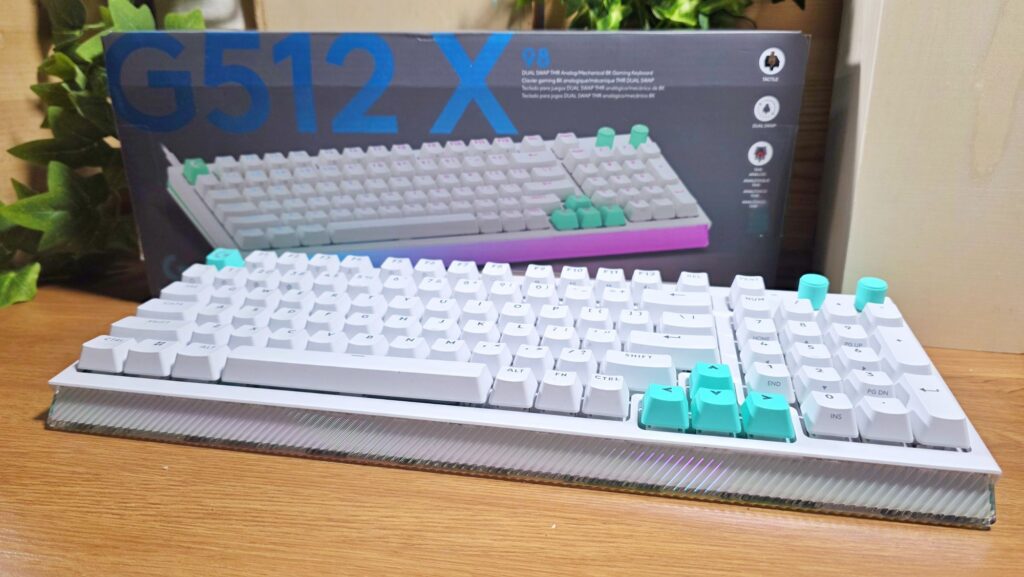
Both the 75-key and 98-key variants also come in your choice of either a black with purple trim colourway or a more classic white with teal trim finish that harkens back to Logitech’s product livery from their early years, which lends it a very unique retro 80’s vibe.

The keyboard comes with an absolute wealth of extra kit. Out of the box, you get a USB-C-to-A cable for connecting the keyboard to your PC as well as a pair of keycap removers that also double as risers that neatly attach to the underside of the keyboard to elevate the angle at a 8-degree tilt for a better typing experience.

The goodies don’t end there. You also get 5 replacement keycaps for the Esc and direction keys done up in white that let you replace the default units printed in teal. If you get the purple and black colourway, you get a set of black keys for a more standardised look.
That’s not all, you also get a set of nine analog Gateron KS-20 switches set into a recessed bay on the rear of the keyboard. Logitech also throws in five additional Second Actuation Pressure Point (SAPP) o-rings for multipoint actuation scenarios inset into a slot in the underside of the keyboard.
What takes the cake is how Logitech has, for the most part, integrated them all into the design for easy transport rather than forcing you to tote them all around separately and inevitably losing them by accident a few weeks down the line.
Up front, you get an RGB light strip at the base of the keyboard that is protected by a slab of plastic that resembles frosted glass. Both the left and right sides of our Logitech G512 X review unit feature a cyberpunk aesthetic with a teal racing stripe that stretches around and across to the rear.
The rear of our Logitech G512 X review sample is jam-packed with a load of features. Running across the majority of the rear is a clear plastic panel that protects the recessed storage bay for the aforementioned nine analog switches. Alongside the switch storage bay is a USB-C port as well as a button that scans the keyboard to register what switches you’re using at a given moment in time.
Emplaced just beneath the switch storage bay is a slot for five SAPP O-rings. However, there’s no protective cover and the rings are held in place purely with friction in their respective slots which increases the risk of losing them over time.

Up top, our Logitech G512 X review sample has a full-sized 98-key setup that features teal accents on the Esc key, the direction keys and two programmable dials with one preset to control volume out of the box and the other to control RGB lighting brightness.
Also available is an optional acrylic wrist rest that you can slide in front of the keyboard just in front of the light bar that further enhances the lighting effect from the front light strip. This isn’t bundled with the keyboard and is sold separately for RM169.

What makes the Logitech G512 X keyboard unique is its Dual Swap function that allows you to hot swap between analog or mechanical switches though not all of the keys possess this capability. Of the 98 available switch beds, 39 of them, clustered primarily on the left half of the keyboard including the direction keys and space bar save for the Esc, function and Windows shortcut key, have Dual Swap capability.
These 39 Dual Swap switch beds let you swap freely between analog switches or mechanical switches. To further tweak its tactility, you can also use the aforementioned SAPP o-rings to introduce additional resistance when depressing a key.
This clustering of Dual Swap keys on the left side is primarily to cater to the most common keys used in gaming as well as most of the usual shortcuts needed for first person shooters and MOBA-style games which makes pragmatic sense as it caters to the majority of the most popular gaming genres.
It sounds baffling, but essentially the keyboard has 39 Dual Swap switch beds and gives you a cache of 9 analog switches and a set of 5 o-rings to mix and match with on the keyboard. If you’re a fairly savvy modder, you can opt for your own third-party mechanical switches with a 3/5 pin setup.

The provided analog switches use Tunneling Magnetoresistance (TMR) sensors that have the option for you to assign two actions to a single keypress depending on how deep you depress the key which comes in handy in FPS or fighting games as well as support for Rapid Trigger in case you need to spam a button repeatedly.
Out of the box, Logitech only includes 9 TMR analog switches despite there being 39 Dual Swap switch beds. This means you can only equip nine analog switches at once unless you source additional compatible switches yourself, and only five of those can make use of the included SAPP o-rings.
Hopefully in future iterations Logitech provides enough switches and matching numbers of o-rings tso that you can use all the switch beds rather than only a select few.
That quibble aside, build quality for our Logitech G512 X review sample is pleasantly solid though it is made primarily from polycarbonate and the integration of the additional swappable components directly into the chassis is a brilliant stroke of design. Even after several weeks of heavy use hammering out paperwork and gaming, the PBT Doubleshot keycaps and the keyboard itself remained in excellent condition without noticeable wear or tear.
The optional palm rest does what it is supposed to do and offers a more comfortable typing angle for extended use while looking rather stylish, with the translucent plastic offering a unique look from the RGB lighting emitted from the keyboard but is rather expensive for what it does.
Logitech G512 X Review – Setup and Performance
Getting our Logitech G512 X review sample up and running is simply a matter of plug and play by connecting the provided USB C-to-A cable to our test PC. However, if you aim to customise macros and key assignments or otherwise alter any settings, you’ll need to install their free G Hub app.
Unfortunately, the keyboard does not support wireless connectivity and you’re relegated strictly to a wired connection which feels quaint, seeing how much the keyboard costs.
With some tweaking, I managed to work out a decent setup for Call of Duty Warzone with the WASD keys and still have enough keys left for other necessary shortcuts for throwing tacticals and lethal throwables and for calling in support killstreaks.

In this regard, the improved responsiveness of the analog TMR switches made a subtle difference in performance though it still takes getting used to – I ended up fumbling multiple matches before getting the hang of things and there’s quite a bit of time spent tinkering with key mapping before i got something satisfactory but if you’re a fairly serious player, it’s likely worth the trouble.
The hybrid nature of the keyboard doesn’t fare as well if you’re using it for paperwork too. Unless you’re fairly diligent in swapping switches every time you play games and use the keyboard for productivity tasks, odds are you’ll likely end up using a mixture of both analog and mechanical switches.
When writing, where you use most of the keys, the combination of analog and mechanical keys makes typing an uncomfortable experience as you’re getting different tactility from the analog switches that you swapped out to.
What this ends up as is an awkward typing experience with 9 of the keys, assuming you use every analog switch, feeling different when you type which can throw you off when you’re touch typing.

With a pure mechanical key setup, our Logitech G512 X review sample performed well for work-based scenarios and I managed to get a decent 90wpm. The numeric keypad comes in handy for spreadsheets and number crunching.

As it stands the Logitech G512 X remains one of the few keyboards that genuinely allows users to tailor its layout for both gaming and productivity, albeit with some effort. While the provision of built-in storage into the keyboard itself for all its extra bits is welcome, odds are that you won’t be swapping keys every time.
Should you buy the Logitech G512 X keyboard?
The Logitech G512 X is a bold, innovative design that attempts to blend the best aspects of a mechanical and analog keyboard into one form factor with a host of well thought out features like integrated storage for its provided set of accessories.
However, you don’t get enough analog switches to fully outfit the 39 available Dual Swap key switch beds though it does accept third party switches. Even so, swapping switches constantly can quicky prove to be tedious over time and once the novelty wears off, you’ll likely stick to one preferred configuration for work and play.
This does not dismiss its unique ability to accommodate both gamers and desktop jockeys alike. If money is no object and you’re looking for the absolute cutting edge in keyboards, this is well worth a look.
Specifications
Price RM829 [98-key], RM799 [ 75-key], RM169 [palm rest – sold separately]
Type Dual Swap Analog/Mechanical Switch 98-key keyboard
Sensor Technology 8kHz or 1kHz report rate
Size/Weight 387 x 150 x 47mm /1,000g [98-key] / 387 x 86 x 19mm / 490g [palm rest]
Logitech G512 X review sample courtesy of Logitech Malaysia. For more details please visit https://www.logitech.com/en-my/shop/p/g512-x-98-gaming-keyboard.920-014010
Logitech G512 X
-
Design
-
Performance
-
Value
-
Features
Logitech G512 X
The Logitech G512 X is a unique melding of concepts, combining aspects of an analog and mechanical keyboard into one design with some compromises. It requires some amount of tinkering to adapt it to your personal tastes and doesn’t come cheap but the unique nature of its design mkes it worth a look.
Pros
Storage bays for extra keys
Superb typing experience
Unique white and teal colourway harkens to Logitech’s classic livery
Deep customisability
Cons
Not cheap
Palm rest requires additional investment,
Wired connectivity only
More analog switches would have been nice