

Dell XPS 14 9440 review – Stylish performer takes the field
Dell has made a name for itself with their XPS series of ultraportables that are typically designed for the corporate elite but their new Dell XPS 14 also referred to as model 9440 aims to take things up a notch with the inclusion of an NVIDIA GeForce RTX4050 graphics card that lends it a modicum of content creation capabilities.

We managed to get a sample for field testing and after taking it for a whirl around the block here’s our Dell XPS 14 9440 review where we share if it’s worth its substantial asking price.
Dell XPS 14 9440 review – Build and Design
Table of Contents
In terms of build and design, our Dell XPS 14 9440 review sample looks the business with an all-metal chassis that won’t look out of place in any boardroom. The top features the Dell logo and a polished Platinum finish that works out into a matte gunmetal colourway that repels fingerprints nicely. The top lid is solidly built and there’s no give or play even when prodded in the centre as with cheaper designs.
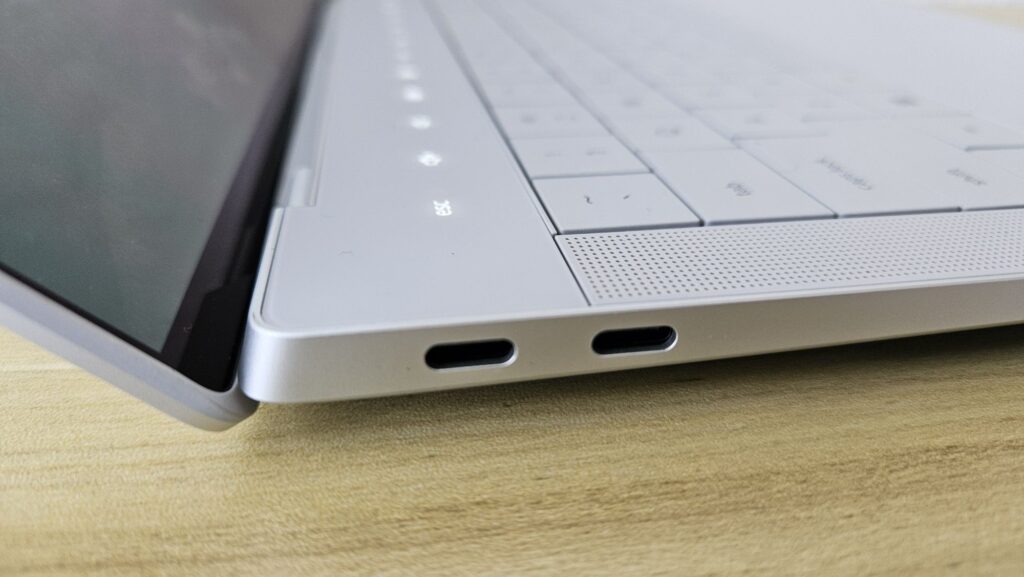
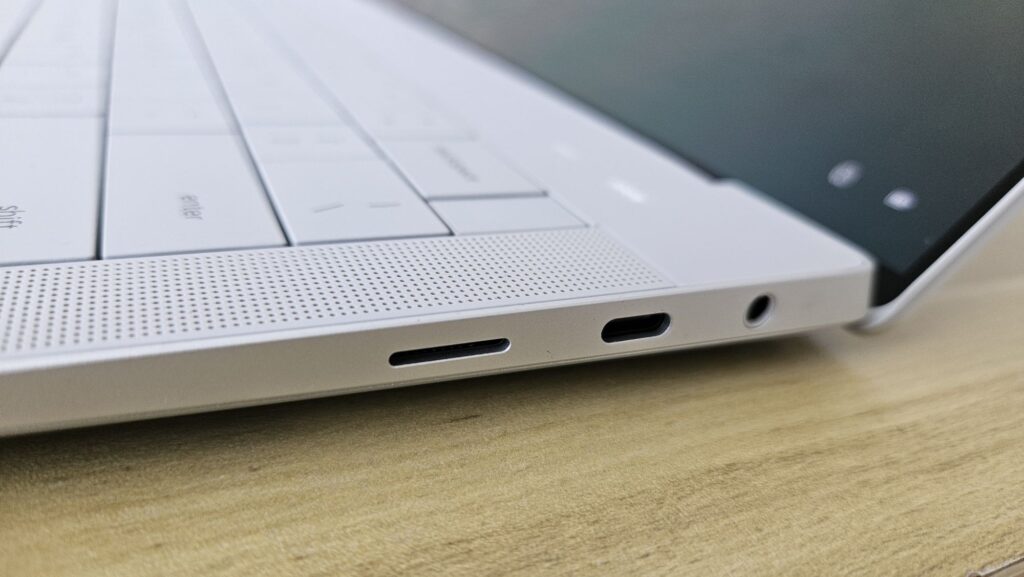
The left side of the laptop hosts a pair of Thunderbolt Type-C ports with Power Delivery and DisplayPort support while the right has a single Thunderbolt Type-C port flanked by a microSD card reader and a 3.5mm audio jack. The base includes a set of grilles on the sides for two of the downward-firing speakers with the other two upwards-firing speakers flanking the keyboard. While a USB-A or HDMI port would have been welcome, Dell did include a dongle featuring both ports with the laptop itself.
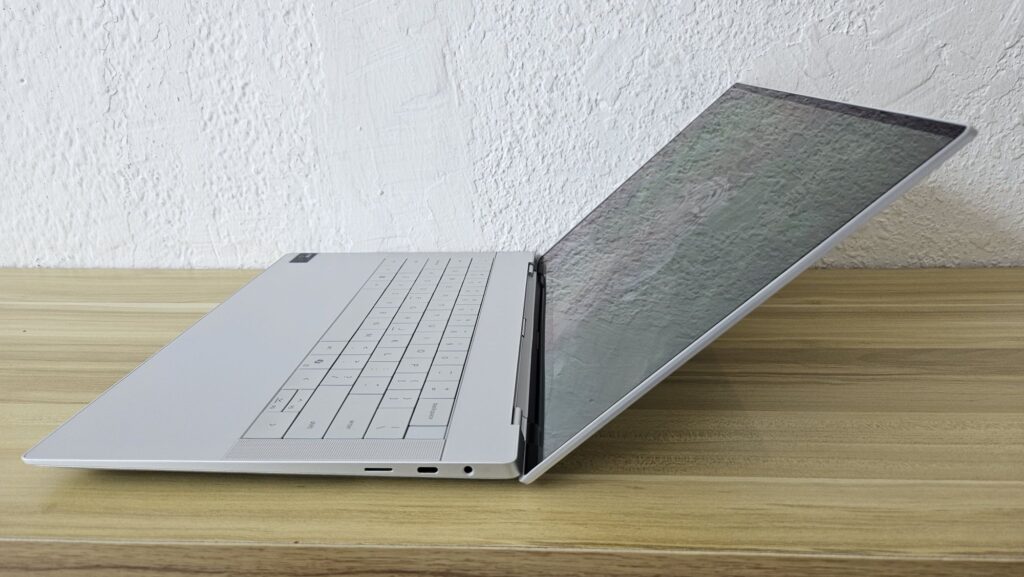
Flipping the lid open may be a challenge to do one-handed as there’s no finger notch or groove, requiring you to gingerly hold both sides to open it. Opening the lid reveals a 14.5-inch Infinity Edge display that can be acquired in your choice of either a 3.2K OLED (3,200 x 2,000 pixels) or a non-touch version with FHD+ resolution (1,920 x 1,200 pixels) and for a lower cost. One quibble here is that the hinge doesn’t open completely flat and maxes out at about a 120-degree angle or so.
When opened, you get their InfinityEdge display with a 1080p webcam up top that has support for Windows Hello face recognition. Alternatively, you can opt for the power button that doubles as a fingerprint reader in the upper right corner of the keyboard to unlock the laptop. Unfortunately, the webcam has no privacy shutter which is quickly becoming a necessity in this day and age.
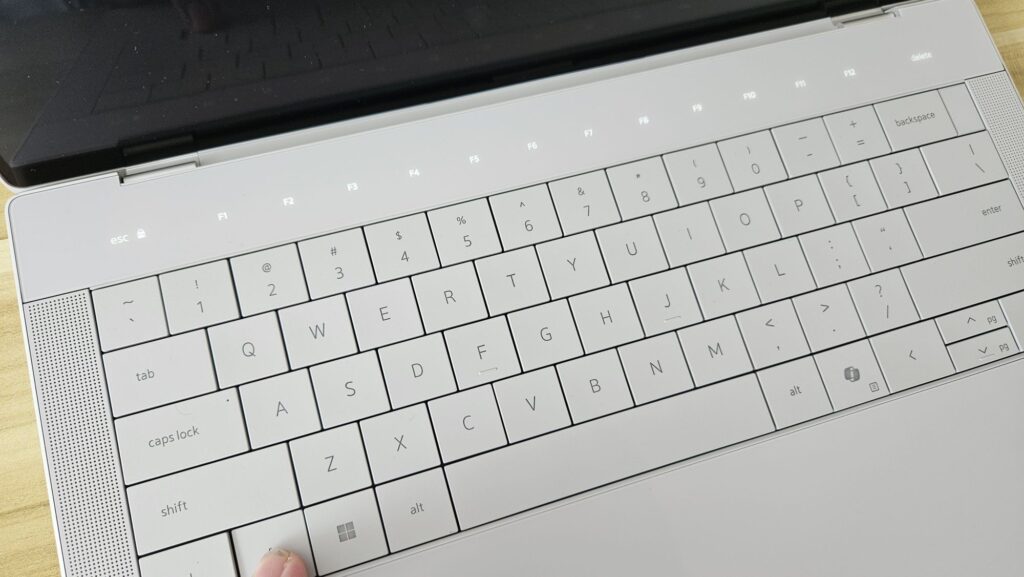
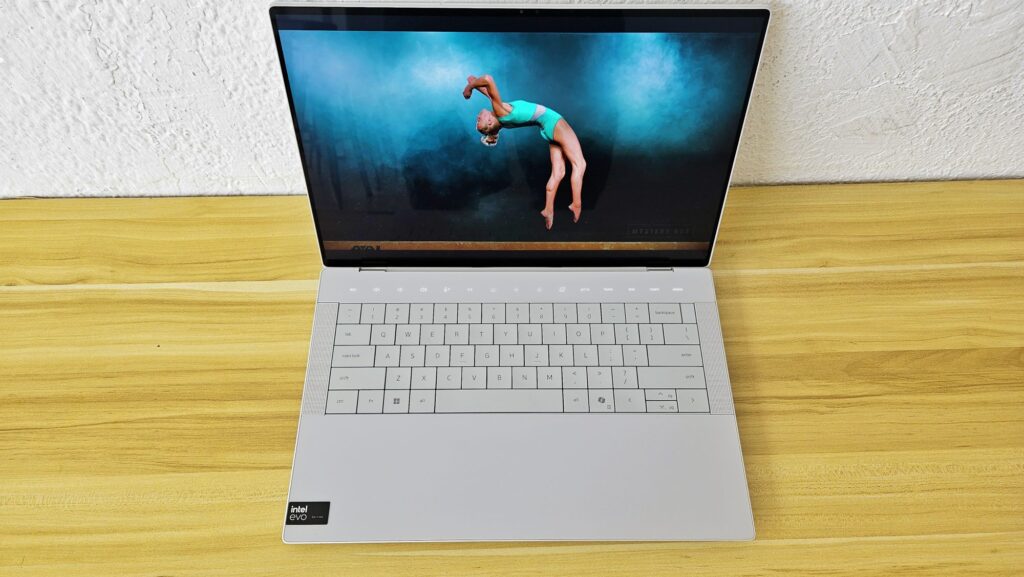
You also get to lay eyes on their minimalist design language. Dell is continuing their prior design language from prior XPS series laptops with a sleeker, more seamless looking design which includes a glass touchpad that is integrated into the palm rests such that you can’t find where one begins and the other ends. Another aspect of their design language is their top set of context sensitive playback, brightness and control keys that only lights up when needed and that perform double duty as the F1 to F12 function keys.
Overall build quality is excellent in keeping with Dell’s attention to quality and the premium finish and design ensures that it won’t look out of place in any corporate boardroom. Unfortunately, the laptop is rather heavy at 1.74kg. One thing to note though is that the Platinum finish of our Dell XPS 14 9440 review sample isn’t available in Malaysia with only the matte black Graphite versions available in the country along with a few other key differences.
Dell XPS 14 9440 review – Performance and Benchmarks
In Malaysia, the Dell XPS 14 9440 can be acquired in a number of different configurations but all come with an Intel Core Ultra 7 155H processor with either 16GB or 32GB of RAM, either a touch capable OLED display or a non-touch FHD+ IPS LCD display, up to 2TB of storage with the base configuration coming with a 512GB SSD and your choice of plonking in an NVIDIA GeForce RTX 4050 GPU with 6GB GDDR6 VRAM or relying on the Intel Arc integrated graphics.
In its base configuration, the XPS 14 is a capable workhorse that can tackle anything expected of an executive but plonking in the RTX 4050 expands its capabilities, allowing it to tackle a modicum of content creation and a modest array of gaming too. Here’s how it stacks up on paper:
| Price | From RM7,299 |
| Display | 14.5-inch FHD+ (3,200 x 1,200) Infinity Edge OLED, touch, 60Hz refresh rate |
| Processor | Intel Core Ultra 7 155H |
| OS | Windows 11 Home |
| Memory | 32BLPDDR5X / 1TB M.2 PCIe NVME SSD (tested) |
| Graphics | NVIDIA GeForce RTX 4050 w/ 6GB GDDR6, 30W (tested) / Intel Arc graphics |
| Battery | 69.5Whr 6-cell w/ 100W charger |
| Size/Weight | 320 x 216 x 18mm /1.74kg |
Our Dell XPS 14 9440 review sample maxes out all the hardware to experience it at its fullest potential with a touch OLED display, the full 32GB of RAM, a 1TB SSD and the NVIDIA RTX 4050 laptop graphics card.
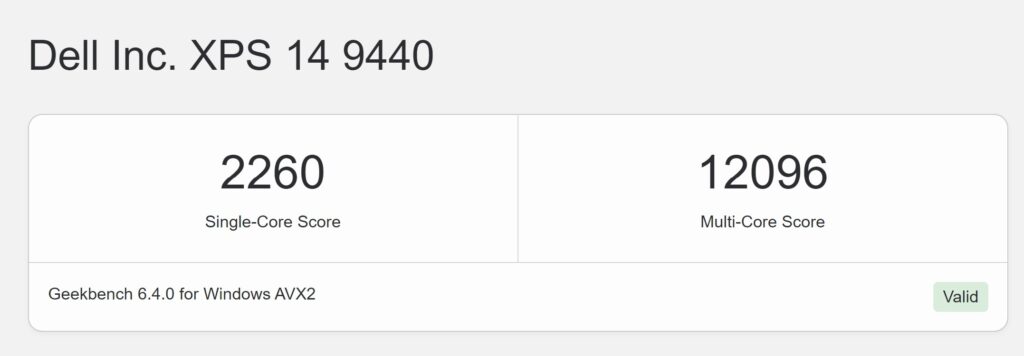
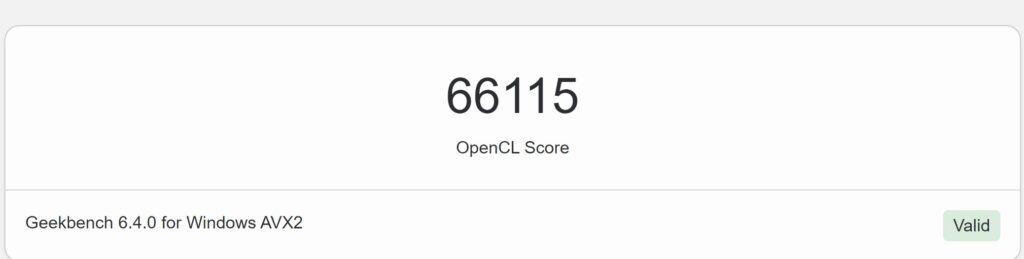
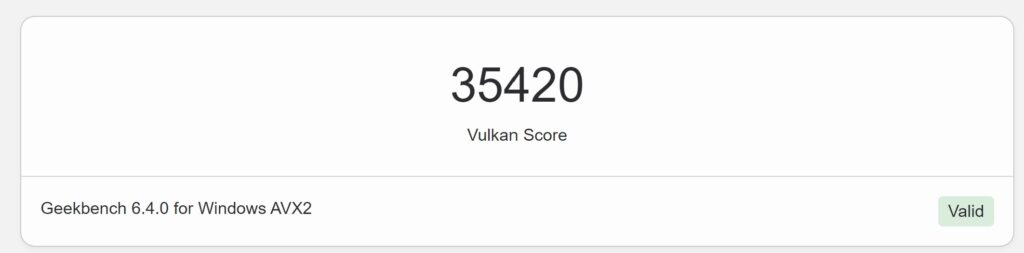
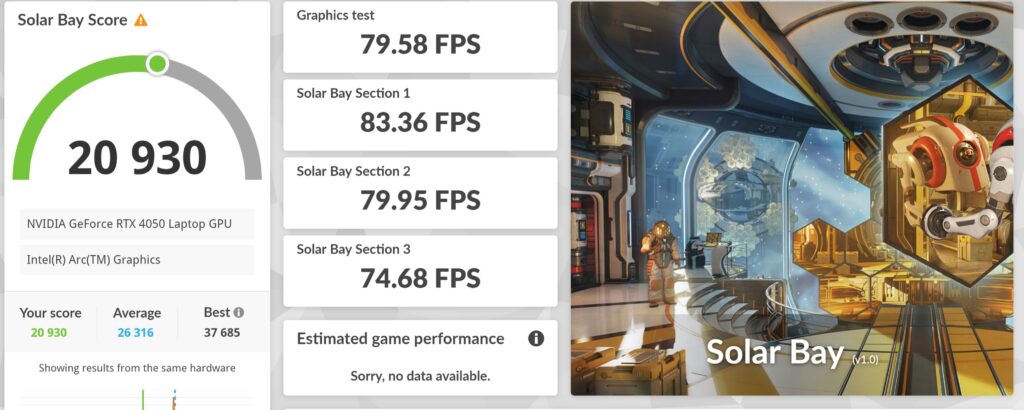
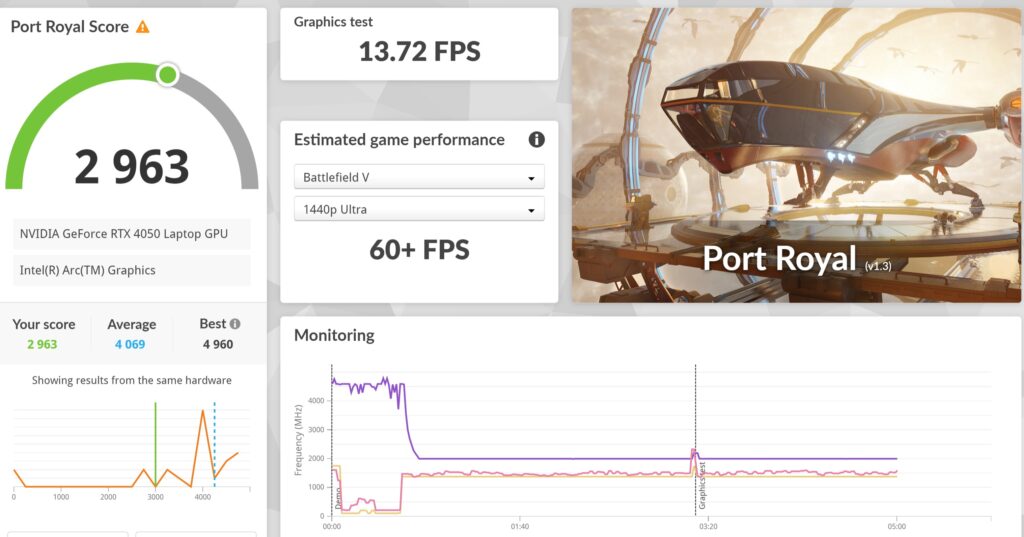
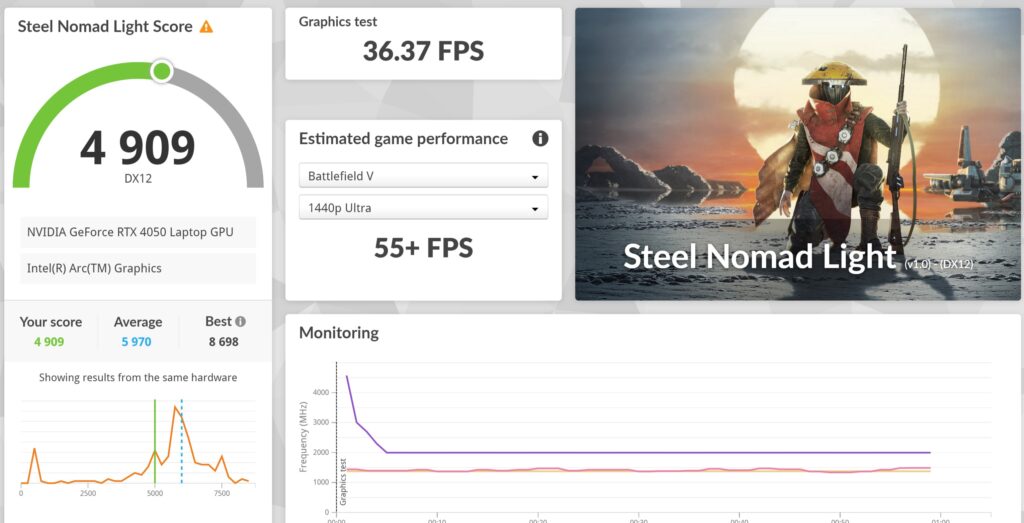
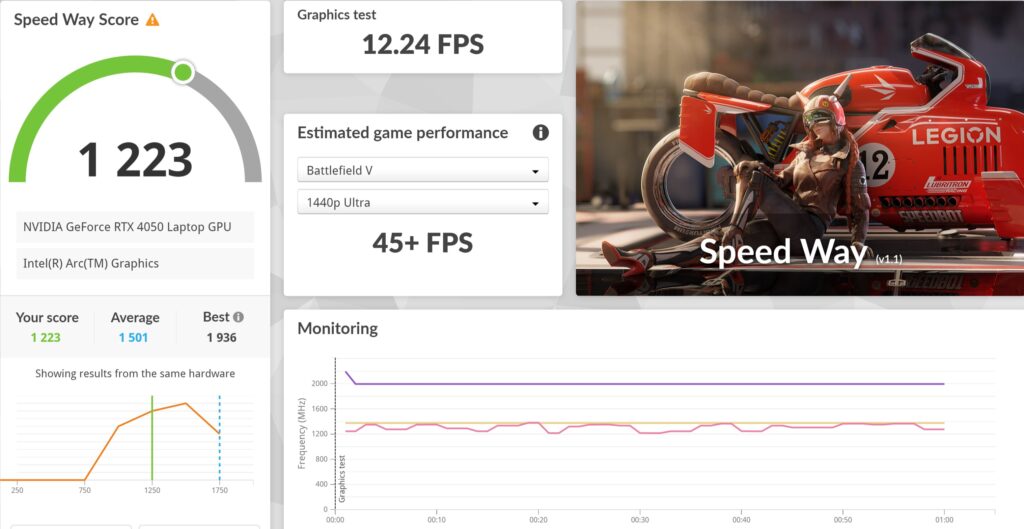
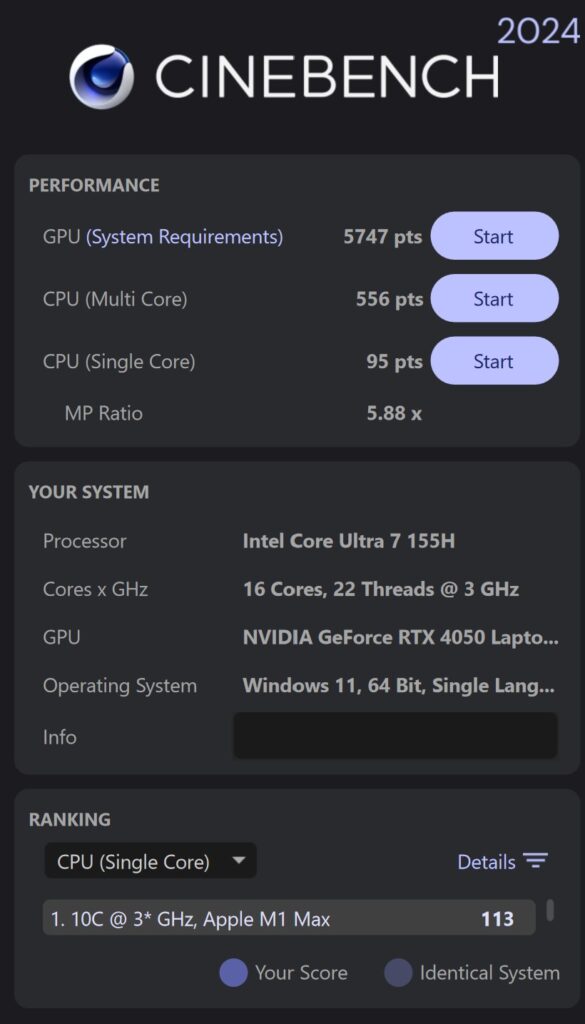
When subjected to benchmarks, our Dell XPS 14 9440 review sample scored the following:
| 3D Mark Time Spy | 5,127 |
| 3D Mark Time Spy Extreme | 2,483 |
| 3D Mark Solar Bay | 20,930 |
| 3D Mark Port Royal | 2,963 |
| 3D Mark Steel Nomad Light | 4,909 |
| 3D Mark Steel Nomad | 1,105 |
| 3D Mark Speed Way | 1,223 |
| Geekbench 6 Single Core | 2,260 |
| Geekbench 6 Multi Core | 12,096 |
| Geekbench 6 OpenCL | 66,115 |
| Geekbench6 Vulkan | 35,420 |
| Cinebench 2024 Multi Core | 556 |
| Cinebench 2024 Single Core | 95 x 5.58x MP ratio |
| PC Mark 10 Extended | 6,780 |
| PCMark 8 Battery Life (Work) | 5 hours 36 mins |
In terms of overall performance, our Dell XPS 14 9440 review sample acquitted itself in an admirable fashion with the generous amount of RAM, Intel Ultra 7 155H CPU and the GeForce RTX 4050 GPU enabling it to tackle any general computing related task from crunching through reams of spreadsheets up to crunching large PowerPoint presentations.
It’s even capable of tackling video editing related tasks too with comfortable 1080p video editing on DaVinci Resolve and 4K video on CapCut without issue. While not intended as such, it’s capable of a modicum of gaming too and was capable of tackling Cyberpunk 2077 on low settings which makes for a pleasant surprise though the laptop isn’t intended as a gaming rig per se as the GPU is capped at 30W due to the thin and light design of the laptop.
The provided 14.5-inch Infinity Edge touch panel is vibrant and offers crisp detail and pin-sharp text indoors but the glossy panel makes it hard to see under daylight conditions. Of note are the quad speakers which offer a decent amount of volume and detail for casual listening or work calls alike. On that note, Dell’s 1080p webcam does a decent job, delivering nice, clean footage.
In general, the typing experience offered is smooth, precise and responsive though the need to retrain muscle memory to accommodate the odd playback and function keys on the top row as well as the inability to distinguish the edges of the track pad by touch mean that it’s not for everyone.
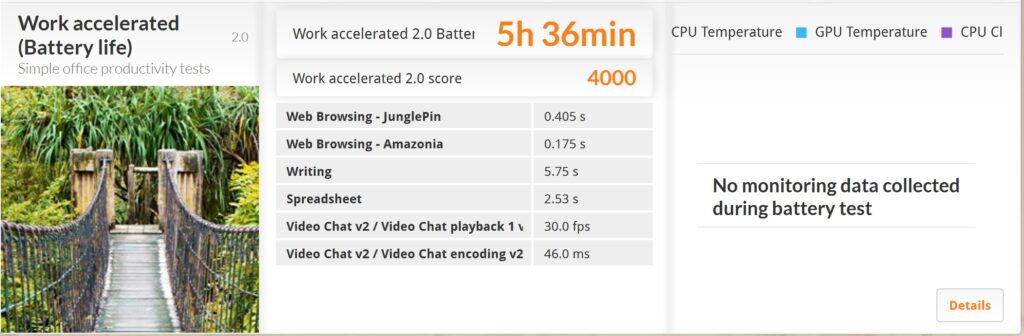
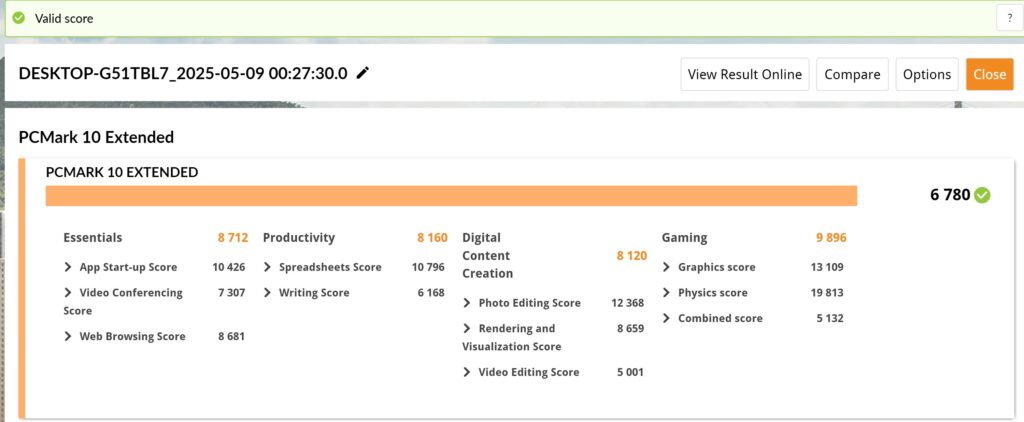
In terms of battery life, our Dell XPS 14 9440 review sample doesn’t break any speed records but offers enough endurance to last the better part of a work day with a normal workload. In a modest PC Mark 8 battery life test in the Work profile, it got 5 hours and 36 minutes. Fortunately, the provided 100W charger is slim and relatively compact which makes recharging it in the field less of a chore.
Should you buy the Dell XPS 14 9440?
If you’re looking for a sleek, sturdily built and posh looking productivity laptop, the Dell XPS 14 9440 is well worth a look though it does not come cheap. It also has a rather unorthodox design that prioritises aesthetics over function with the touchpad that is integrated into the palm rests which makes it hard to figure out where one part ends and the other begins. While less of an issue, the top row of playback haptic keys that double as function keys seems primarily for aesthetics rather than for practical ergonomic reasons.
Regardless of configuration, all versions for the Malaysia market will inevitably use the Intel Core Ultra 7 155H with permutations for RAM, storage and, more importantly, whether you’re willing to shell out more for the dedicated NVIDIA GeForce RTX 4050 GPU. If your work profile is solely related to productivity with little content creation, you can safely nix it but if you’re looking at a more general work profile that includes video editing, content creation and possibly more, it’s well worth the added investment.
Dell XPS 14 9440 review sample courtesy of Dell Malaysia. For more details please visit https://www.dell.com/en-my/shop/laptop-notebook-computers/xps-14-laptop/spd/xps-14-9440-laptop/cxn9440cto02mmyh
Dell XPS 14 9440
-
Display
-
Performance
-
Battery Life
-
Design
-
Value
Dell XPS 14 9440
The Dell XPS 14 is a distinctive looking, stylishly sleek ultraportable with options for an NVIDIA GeForce RTX 4050 GPU, lending it the ability to perform beyond its usual roles for crunching paperwork, allowing for a modicum of content creation. However, it does not come cheap and its unusual keyboard, touchpad and function key design makes for a bit of a learning curve until your muscle memory catches up.
Pros
Distinctive and stylish design
Good speakers
Great performance
Solidly built
Cons
Rather heavy
Not cheap
Touchpad finicky to interact with
Average battery life
Webcam has no privacy shutter